

How it works
- A pull request is opened or updated, and your workflow runs
terraform planas usual. - The Draftt step scrubs the plan JSON on the runner, removing every value Terraform marks sensitive, and uploads the scrubbed copy to Draftt.
- Draftt evaluates the changed resources against your policies.
- The Draftt CI GitHub App publishes the result as a check and a comment on the pull request.
Set up Draftt CI
Two pieces, set up once each:- Install the Draftt CI GitHub App on the repositories that hold your Terraform code. This binds your GitHub organization to your Draftt organization and lets Draftt publish on your pull requests.
- Add the Draftt CI GitHub Action to the workflow that produces your plan, with a Draftt access key.
What the pull request shows
A Draftt Terraform Policy Scan check and a comment, updated on every push. For each changed resource that violates a policy, you see the resource, the policy, and the change needed, with a link to the line in your code.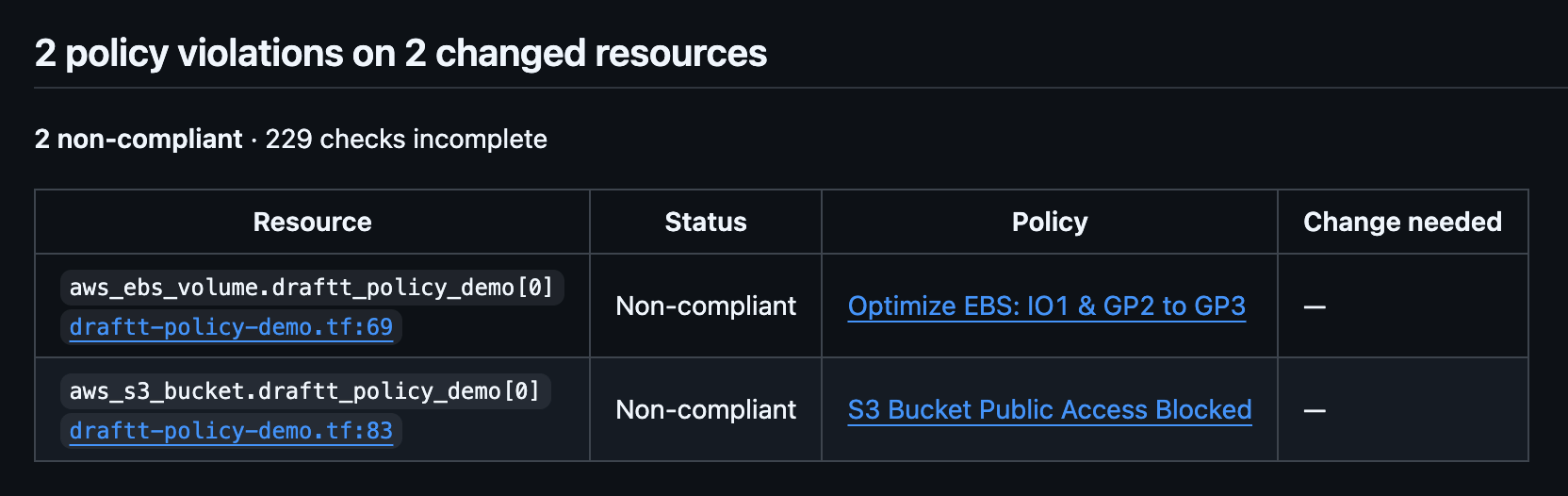
success when no changed resource violates a policy and neutral when one does. It never concludes failure. This is on purpose: Draftt CI should never block a team on the day it is adopted, so the check reports and lets your reviewers decide. Don’t make it a required status check.
When you are ready to enforce, you have two levers:
- Fail on scan errors. Set
fail-on-scan-error: "true"on the Draftt step, and the step fails when the plan could not be scanned, for example because the key is missing. - Fail on violations. Read the
violation-countoutput in a later step and fail the job when it is not0, and make that job a required status check. See Outputs.
Next
- Draftt CI GitHub App: installation, how it works, results on the pull request, settings.
- Draftt CI GitHub Action: the workflow step, inputs, outputs, several root modules, what is sent to Draftt, limits and troubleshooting.
- Questions: support@draftt.io.